Settings
Configuring field groups allows you to customize and organize forms in the Prestashop back office.
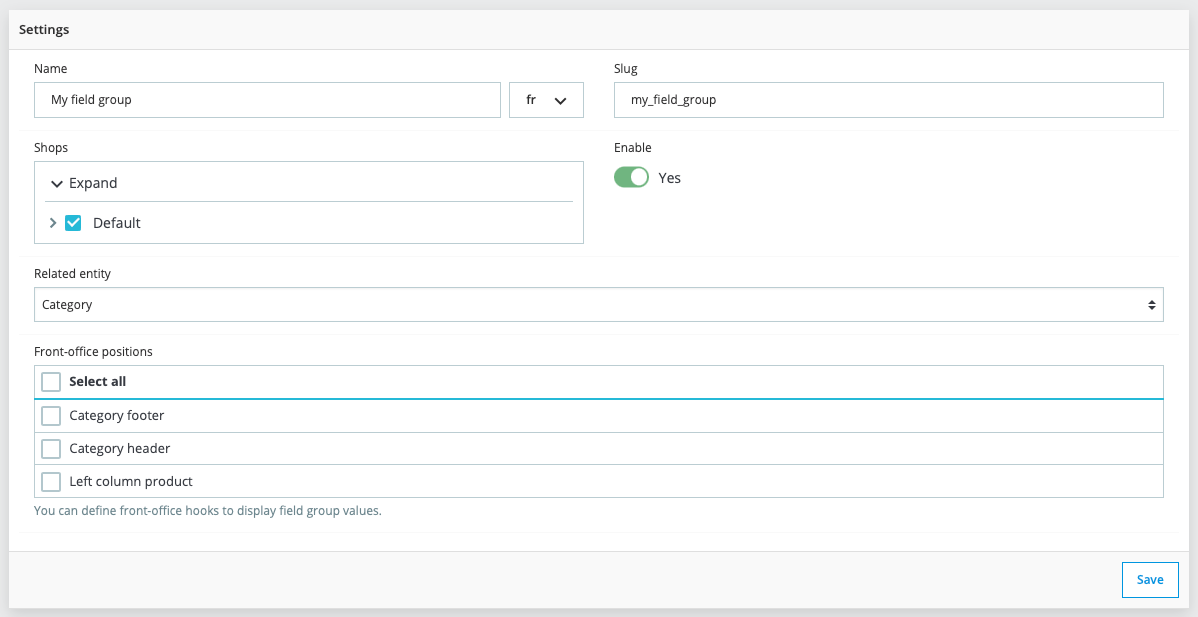
Here are the main settings to configure when creating a field group, with examples for each part:
Name
- Description: The name of the field group, used to easily identify it in the back office interface. This name will be displayed above the form in the rendered view.
- Usage: Choose a descriptive name that reflects the content or use of the field group.
- Example: Additional product information
Slug
- Description: A unique identifier for the field group, used to retrieve field group data and distinguish it from other groups.
- Usage: This slug must be unique within your Prestashop installation and is often used in the code to reference the field group.
- Example: extra_product_info
Enabled shops
- Description: The shops where the field group will be available.
- Usage: Select the shops where you want this field group to be active. This is useful for multi-shop setups.
Entity
- Description: The entity to which the field group form will be associated.
- Usage: Choose the appropriate entity where the form will appear. The available entities are:
- Product
- Category
- Customer
- Customer Address
- Customer Group
- Brand
- Supplier
- CMS Page
- CMS Category
- Shop
- Shop Group
- Language
- Zone
- Country
- State
- Currency
- Gender
- Tax
- Tax Rules group
- Order State
- Specific Price Rule
- Store
- Meta
- Employee
- Profile
- Tag
- Alias
- Search Engine
- SQL Query
- Webservice Key
- Custom Setting : Create a configuration page in the section "CFG > Custom settings"
- Module : This entity usage is explained in the module section of the documentation.
Font-office positions
- Description: Front-office positions of the field group.
- Usage: Define the front-office positions for the field group. The list of hooks depends on the selected entity. You don't have to use this feature to display data in the front-office; you can use a different method, as detailed in this section.
Position
- Description: The position of the field group, useful for product entity.
- Usage: Define the position of the field group within the entity form. For example, for products, this determines where the field group will appear relative to other sections of the form.
- The available positions are:
- seo
- combinations
- shipping
- stop
- description
- options
- pricing
These settings allow you to configure each field group precisely and customize it, ensuring seamless and functional integration into the Prestashop back office. By following these examples, you can easily create field groups tailored to your specific needs.