How to use
Once you have created and configured field groups in the Custom Field Groups module, they are ready to be used seamlessly within PrestaShop's native entity forms as well as in compatible modules. Here’s how you can utilize field groups effectively:
Ready-to-use integration
Field groups are integrated directly into the native forms of PrestaShop entities such as products, categories, customers, etc. After creating a field group, it becomes instantly available for use without requiring additional configuration.
Managing Field Groups
Customizable number of Field Groups
You can create and use as many field groups as needed on the same entity. This capability allows for extensive customization and organization of data within entity forms.
Switching between entities
You can associate a field group with different entities within PrestaShop. For example, a field group initially created for products can be effortlessly switched to apply to categories or any other supported entity.
Changing field order
Field groups offer dynamic management of field order. You can easily rearrange the sequence of fields within a group using drag-and-drop functionality. Changes to the field order are automatically reflected in the entity forms, ensuring consistency and ease of use.
Example form integration
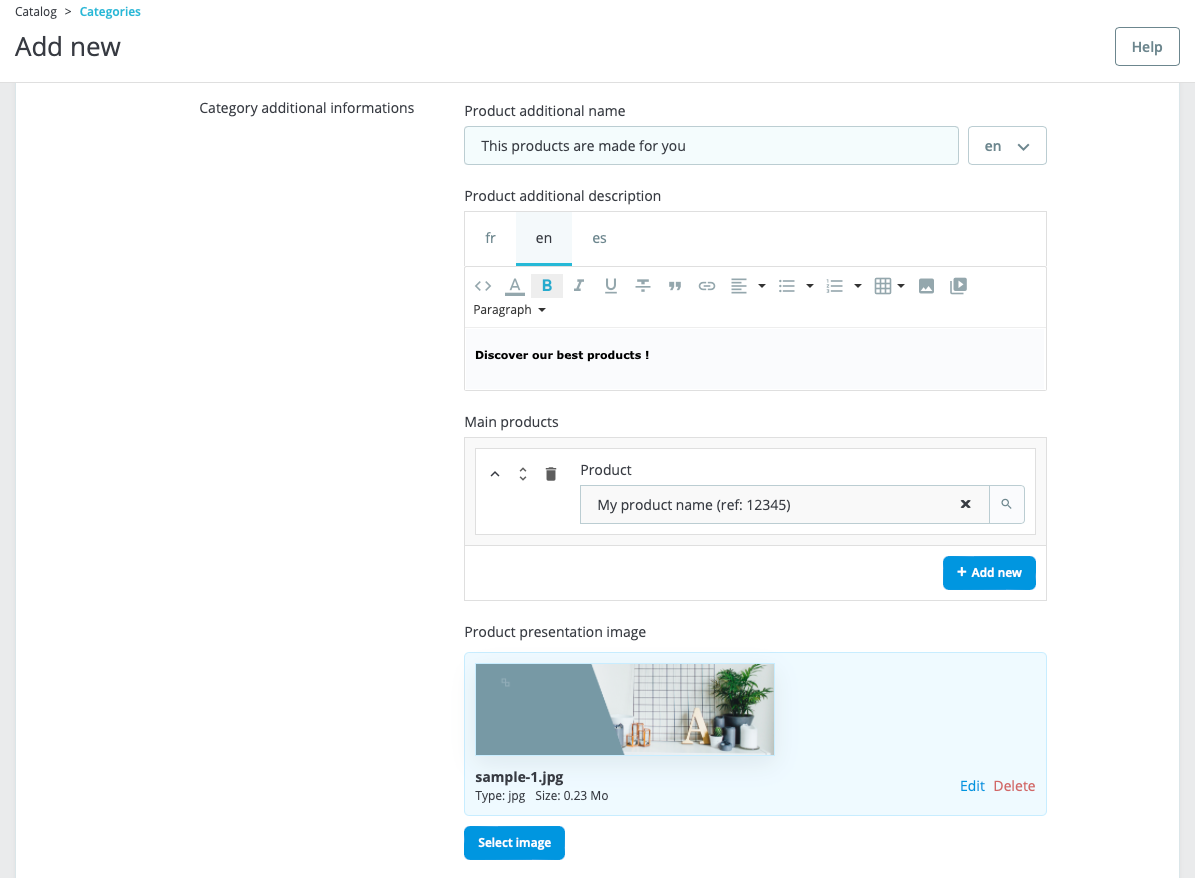
Below is an example of how a field group appears integrated into a PrestaShop entity form:
Benefits of using Field Groups
- Efficiency: Save time by avoiding repetitive configuration tasks.
- Flexibility: Adapt field groups to different entities and adjust field order effortlessly.
- Consistency: Ensure a cohesive user experience across various forms within PrestaShop.
By leveraging field groups in this manner, you can enhance data management efficiency and user experience within your PrestaShop back office.